
The short answer
The short answer
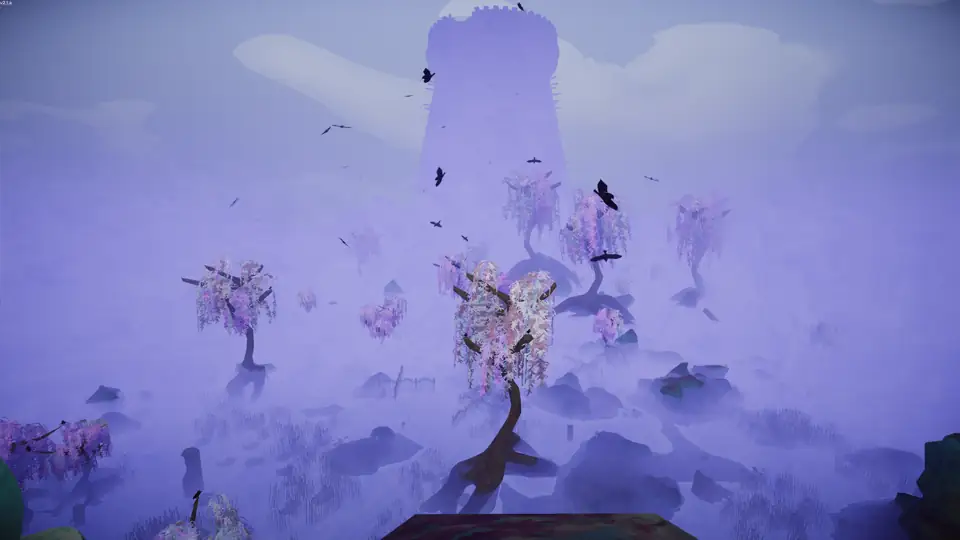
Gloom is a late-route context introduced by The Final Ascent, not a guarantee that every daily sequence contains the same map. Use the current map card as a dated estimate, confirm the route in-game, and carry enough route and recovery utility to handle uncertainty. The official sources confirm Gloom's update and rotation history; exact hazards and item locations should come from the current session.
What the official updates confirm about Gloom
The Final Ascent announcement introduced Gloom and Citadel as part of the final major content update. Patch 2.03.a then added a batch of Gloom and Citadel maps to the daily rotation while Caldera and The Kiln were being prepared to return. The follow-up announcement kept Gloom and Citadel exclusive for another week, and Patch 2.04.a restored Caldera and The Kiln with additional hazards.
That history explains why a screenshot or old route list can mislead. Gloom is a named biome and a source-backed update feature, but the announcement does not prove a fixed daily order, a fixed map layout, or the exact hazards in your current lobby. Use the map page for the dated estimate and the game for the final route.
| Evidence | What it proves | What it does not prove |
|---|---|---|
| Patch 2.0.a / The Final Ascent | Gloom and Citadel were introduced with the final major update. | A permanent daily sequence or one fixed layout. |
| Patch 2.03.a | A batch of Gloom/Citadel maps entered the daily rotation temporarily. | That Gloom is active in every lobby today. |
| One more week announcement | Gloom and Citadel stayed exclusive while Caldera and The Kiln fixes were prepared. | The duration of future rotation windows. |
| Patch 2.6.b | A named revive path in Gloom or Citadel was fixed for Medieval History eligibility. | That every badge or revive report is solved. |
A practical Gloom route plan
Use the first visible commitment to set the team rhythm. Confirm who can read the route, who carries recovery, and where the next safe pause is before spending a rare movement tool. If visibility or a hazard changes the plan, say so in plain language and stop on a surface where the group can regroup. These are field notes, not an official Gloom mechanic claim.
Avoid treating Gloom as a reason to rush. A short detour that preserves a retreat route can be safer than a direct commitment that consumes the last recovery item. Record the date, patch, route label, and the first decision that mattered; that note will remain useful even when the daily pool changes.
- Route Confirm Gloom is actually in the current route before packing for it.
- Visibility Use agreed callouts and stop when a player cannot identify the next safe surface.
- Recovery Assign the recovery item before the risky section, not after a player falls.
- Exit Keep a turn-back rule and a route note for the next attempt.
Gloom badges, revives, and save boundaries
Gloom appears in several badge paths, but the criteria remain separate from the map name. The badge reference lists Gloom-specific actions such as ringing five Belltowers and burning the Big Ghost, while the official 2.6.b note names a Medieval History revive case in Gloom or Citadel. Do not assume that being in Gloom awards a badge by itself.
When a player is revived or reconnects, record whether the run was new, loaded from a campfire, or joined mid-game. Patch 2.6.b should correct the named Medieval History case, but a missing badge still needs the exact trap, revive, host, and version context. Use the achievement troubleshooting page for the trigger table.
| Goal | Check before repeating | Related source |
|---|---|---|
| Gloom map experience | Confirm the current route and patch; do not rely on a dated screenshot. | Map rotation page and official rotation announcements |
| Gloom-specific badge | Use the exact Accolades criterion and normal expedition rules. | Community badge reference |
| Medieval History after revive | Record whether the player revived in Gloom or Citadel and which patch was active. | Patch 2.6.b |
| Lost state after reconnect | Keep the original host and compare save or live-join state. | Save and reconnect guide |
Gloom checklist for the next run
The checklist is intentionally small. It gives the team a shared decision before the route becomes expensive and produces evidence if a patch or save issue appears. A current game prompt outranks an old community tip; the official posts establish version history, not every movement solution.
- 1. Confirm the map Check the date and status on the map page, then verify Gloom in-game.
- 2. Name the first hazard Agree on the first movement or visibility problem that changes the route.
- 3. Assign recovery Say who carries the recovery option and where it should be used.
- 4. Protect the badge run Use a normal expedition and note host, revive, and save state.
- 5. Record the outcome Write the patch, route, successful decision, and any reportable symptom.
Quick answers
PEAK Gloom guide FAQ
When was Gloom added to PEAK?
Gloom was introduced with The Final Ascent, the official 2.0.a-era major update announced in August 2026.
Is Gloom always in the PEAK map rotation?
No fixed permanent sequence is established by the checked announcements. Patch 2.03.a temporarily added Gloom and Citadel maps, and later patches changed the pool. Confirm the current route in-game.
Does Gloom have special achievements?
The community badge reference lists Gloom actions such as Belltowers and the Big Ghost. Use the exact criterion and a normal expedition; the biome name alone does not unlock a badge.
Why did Medieval History fail after a Gloom revive?
Patch 2.6.b fixes a named case where reviving in Gloom or Citadel could prevent Medieval History. Record the patch, trap state, revive, and save path if it still fails.
What should I bring for Gloom?
Use the current route to choose utility, recovery, and pacing. The official sources do not establish one universal Gloom loadout or fixed item location.
Where can I see today's Gloom route?
Open the map rotation page for the dated estimate and status, then confirm the active route inside PEAK.
Sources and limits
How to read this page
Gloom release and rotation claims come from the official Final Ascent, 2.03.a, Gloom/Citadel, 2.04.a, and 2.6.b Steam announcements. Badge criteria are secondary community documentation. Route and hazard planning notes are field guidance that should be checked in the current session.